
How to Install a Kubota Emulator Chip
This is the cleaned-up TM AG support version of the Kubota emulator chip install sheet. It keeps the real installation flow, shows the original diagram, and calls out the main warning so the machine does not end up with avoidable exhaust restriction after the install.
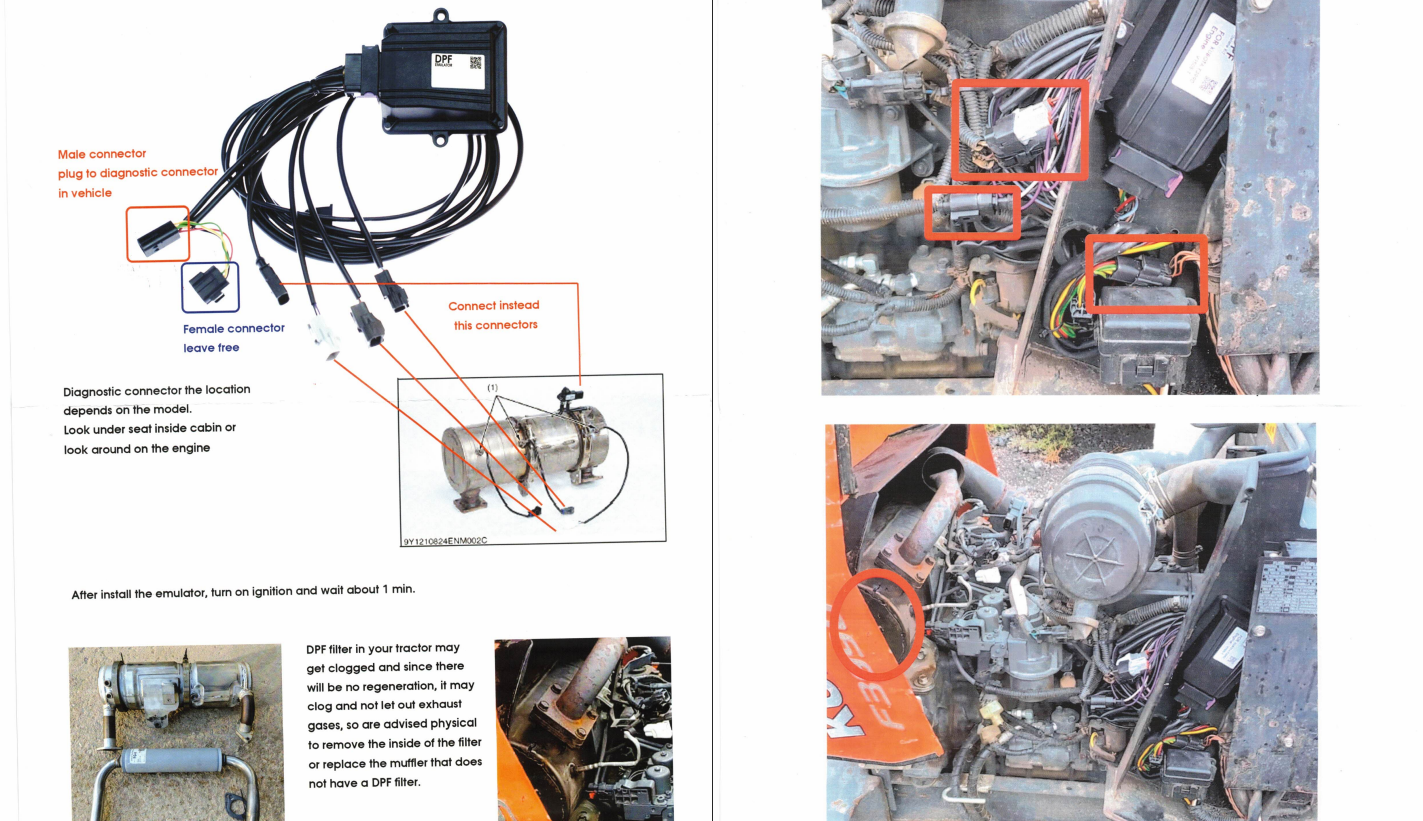
Quick answer: find the machine diagnostic connector, plug the emulator’s male connector into the machine diagnostic connector, leave the emulator’s female connector disconnected, connect the indicated engine-side connectors shown in the install diagram, then turn the ignition on and wait about 1 minute.
Before you start
- Confirm you are working with the correct Kubota emulator chip kit for the machine.
- Understand that the diagnostic connector location depends on the model.
- Check under the seat inside the cab or around the engine when locating the diagnostic connector.
- Use the install diagram below as the main connector-location reference during the job.
Step-by-step install procedure
- Locate the machine diagnostic connector. The original support note says this location depends on the model. First check under the seat inside the cabin, then around the engine if needed.
- Plug the emulator’s male connector into the vehicle diagnostic connector. This is the primary connection called out directly on the install image.
- Leave the emulator’s female connector free. The install image specifically says the female connector should be left unconnected.
- Connect the indicated engine-side connectors shown in the diagram. The image calls out the relevant plug locations with red boxes and arrows. Match your machine to those locations before locking the connectors in place.
- Turn the ignition on and wait about 1 minute. The source install sheet specifically says to wait roughly one minute after installation.
What the diagram is telling you
- Male connector to diagnostic connector
- Female connector left free
- Engine-side connectors shown in red boxes are the ones to reconnect at the machine
- Ignition on, then wait about 1 minute after install
Important exhaust-system warning
The original TM AG support note warns that the DPF filter may get clogged because regeneration will no longer happen after emulator installation. If the filter remains physically intact, it can plug up and restrict exhaust flow.
That is why the original note advises either:
- physically removing the inside of the filter, or
- replacing the muffler with one that does not contain a DPF filter
When to stop and ask for help
- The connector locations on the machine do not match the diagram clearly.
- You are not sure which plug is the vehicle diagnostic connector.
- The machine still shows a DPF-related warning after install.
- The exhaust system is still physically set up in a way that can leave the DPF clogged.
Need help from TM AG?
If you want TM AG to confirm the install path, send a picture of the machine model tag, the connector area you found, and a few clear photos around the engine-side connector locations before plugging things together. That is much safer than guessing off one generic image when the layout is close but not exact.