
How to Perform a Dataset Registration on a CNH Machine
If a CNH machine needs a dataset registration after the modified ECU file has been flashed, start with the ignition-on procedure first. If that does not complete the registration, do it through CNH EST under Configuration > Engine Dataset Registration.
Quick answer: There are two normal ways to do this. First, try the ignition-on registration procedure without CNH EST. If the machine still does not register the dataset correctly, use CNH EST and run the Engine Dataset Registration function, then complete the Write Security check.
Option 1, without CNH EST
- Flash the modified file to the machine.
- Do not start the engine.
- Disconnect the flash tool.
- Turn the ignition to the on position, but do not start the engine.
- Leave the ignition in the on position for at least 20 minutes.
- Turn the ignition off.
- Start the engine and check whether the dataset registration completed successfully.
Option 2, with CNH EST
- Connect the machine correctly with CNH EST.
- Open Configuration.
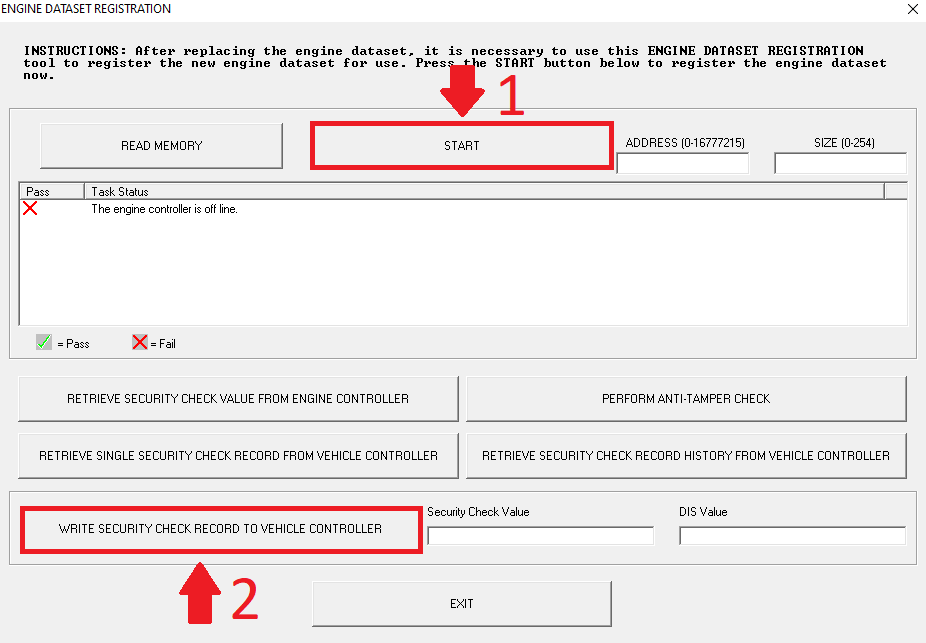
- Select Engine Dataset Registration.
- Click Start and wait for the process to finish.
- When the first process is complete, click Write Security check.
- Wait until EST shows the process is finished, then click Exit.

When this FAQ helps most
Good fit
- The machine was just flashed.
- The machine now needs the dataset registered.
- You are deciding whether the simple ignition cycle is enough or whether EST is required.
If the issue remains
- Confirm the flash completed correctly.
- Confirm the ignition-on wait was long enough.
- If EST was used, verify both the registration step and the write security check completed.
- If the machine still will not accept the dataset, gather the machine details before further diagnosis.
Need help from TM AG?
If you want us to confirm the next step, send the machine make and model, engine family, ECU information, and what happened after the flash. That makes it much faster to tell whether this is only a dataset-registration issue or something else in the workflow needs attention.